
For both Basic and Enhanced mailboxes, our supported Webmail interface is the Group-Office Webmail. It’s a complete re-design, very modern and fast, and it works as well on mobile as on the desktop.
How to access your Webmail
The Webmail doesn’t need additional setup, and you can access it from any computer, smartphone, or tablet without installing other applications.
You can access the Webmail in two ways:
- By typing this kind of URL in the Browser: webmail.mydomain.com (make sure you replace mydomain.com with your domain name). This works only if you have set up the DNS records for the Webmail.
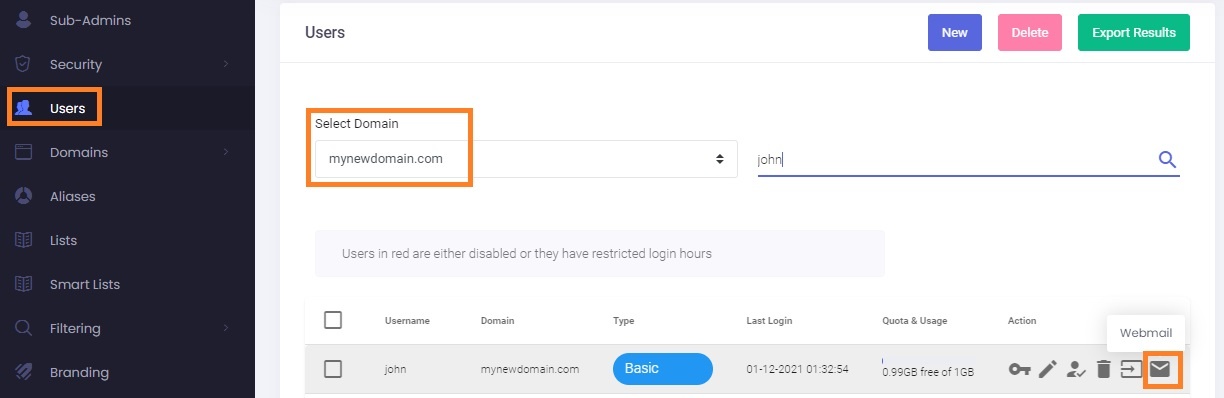
- Straight from your Admin Panel by clicking on the envelope icon on the Users page. You can save the link and bookmark it to your favorite Browser for quick use in the future:
HOW TO SWITCH TO THE NEW WEBMAIL?
You need to configure or modify your DNS by pointing ‘webmail.yourdomain.com’ to webredirect.emailarray.com via a CNAME record.
You would then access your Webmail by visiting http://webmail.yourdomain.com. Use the HTTP protocol, and it will be automatically redirected to HTTPS.